Managing a few products in WooCommerce is simple, but as your store grows, handling hundreds or even thousands of products can become time-consuming.
Updating prices, stock, categories, or variations one by one isn’t practical for large catalogs. That’s where import/export tools come in.
They let you bulk update products using CSV files, migrate data, sync supplier catalogs, or back up your store, all in a fraction of the time.
In this review, we’ll take a closer look at the WebToffee WooCommerce Product Import Export plugin. We’ll explore what it offers, how it works, and whether it’s the right solution for your store.
We’ll cover its key features, ease of use, pricing, pros and cons, so you can decide whether it fits your workflow.
What Is the WooCommerce Product Import Export Plugin?
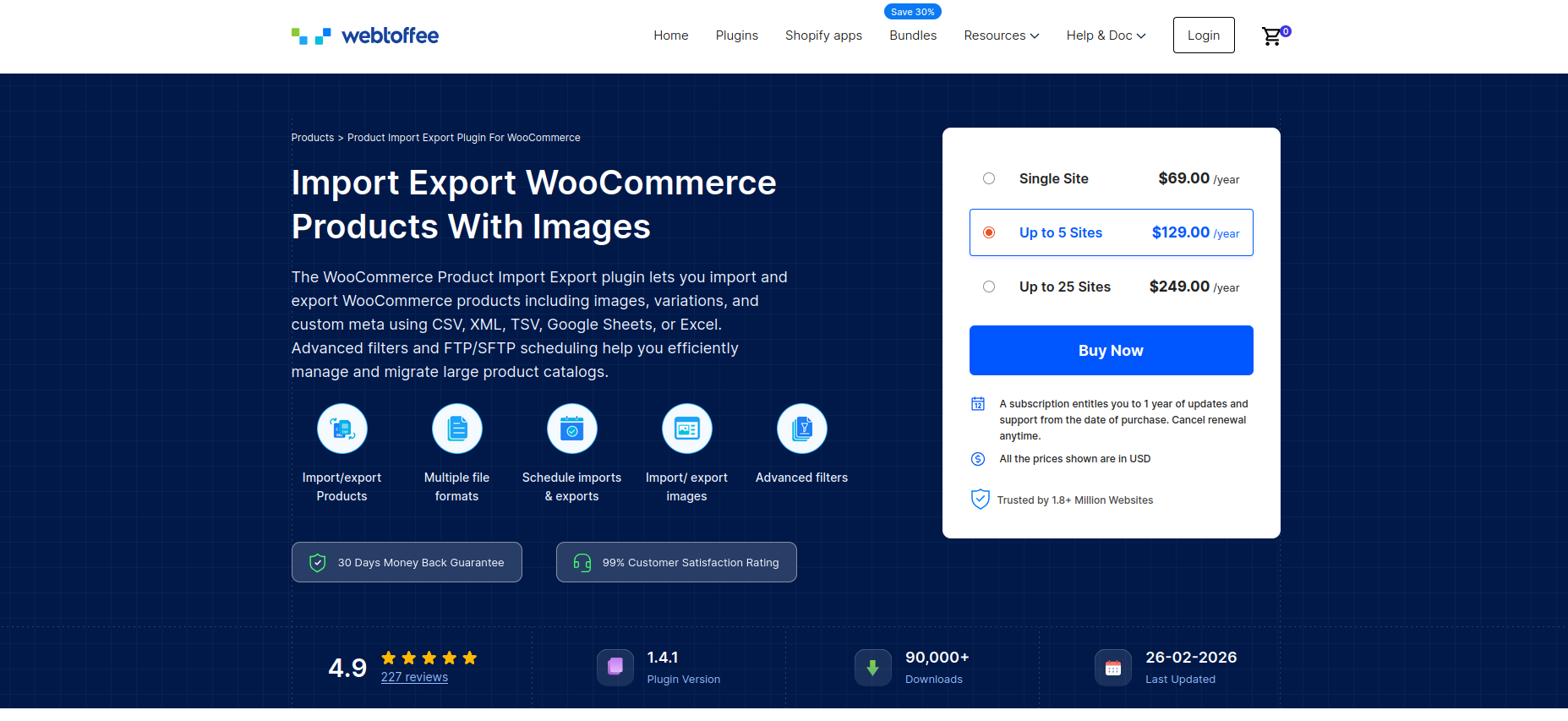
The WooCommerce Product Importer plugin by WebToffee is a tool that helps you bulk import, export, and update products in your WooCommerce store using CSV (and other supported) files.
Instead of manually editing products one at a time inside the WordPress dashboard, the plugin allows you to manage large volumes of product data quickly and efficiently.
Its main purpose is to simplify product data management — whether you’re launching a new store, migrating products from another platform, updating inventory in bulk, or backing up your catalog.
Who Is It For?
This plugin is useful for:
- Store owners who manage large product catalogs and need faster bulk updates
- Agencies managing multiple WooCommerce client stores
- Marketers updating product descriptions, pricing, or categories for campaigns
Anyone dealing with frequent product changes or large inventories can benefit from automating the process.
How It Compares to Manual CSV Import/Export
WooCommerce does include a basic built-in CSV import/export feature. However, it’s limited in flexibility and advanced functionality.
With manual CSV handling, you may face challenges such as:
- Limited filtering options
- Basic field mapping
- Difficulty handling complex product types (like variable products)
- No advanced automation or scheduling
- Limited support for custom fields and metadata
The WebToffee plugin enhances this process by offering advanced filtering, improved field mapping, support for variations and custom fields, bulk updates, and improved error handling, making it more suitable for growing or high-volume stores.
In short, while WooCommerce’s default tool works for simple needs, this plugin is built for scalability and more advanced workflows.
Core Plugin Features
Let’s take a closer look at what the WebToffee WooCommerce Product Import Export plugin offers and how its features support real-world store management.
1. Supported File Formats
The plugin supports multiple file formats, including CSV, TSV, XML, and Excel (XLS/XLSX), giving you flexibility when importing or exporting product data. This makes it easier to work with files generated from different platforms, supplier systems, marketplaces, ERPs, or inventory management tools without needing additional file conversions.
2. Extended Product Types Support
One of the biggest advantages of the WebToffee Product Import Export plugin is its ability to handle all major WooCommerce product types, making it suitable for stores with diverse catalogs.
The plugin supports:
- Simple products
- Variable products
- Grouped products
- Affiliate (External) product
- Custom product types
- Subscription products
This comprehensive support ensures that no matter how complex your store structure is, you can manage your entire catalog in bulk. Whether you’re migrating stores, updating inventory, or syncing product data with suppliers, the plugin maintains product relationships, attributes, and configurations accurately during both import and export processes.
3. Multiple Import & Export Methods
The Import Export Suite provides flexible methods to handle product data transfers, depending on how much control and customization you need.
Quick Import/Export: This option is perfect for straightforward tasks where you want to move all product data with minimal configuration. It’s ideal for quick backups, full catalog transfers, or simple updates without complex filtering or mapping.
Advanced Options & Filters: For more precise control, the advanced mode allows you to fine-tune the process. You can:
- Apply conditional filters
- Skip specific fields
- Modify values during import
- Select only certain products or data fields
This method is useful for targeted updates, migrations, or partial exports where accuracy and control matter.
Pre-Saved Templates: You can save your field mappings and configuration settings as reusable templates. This allows you to repeat the same import or export process with just one click, especially helpful for recurring tasks like monthly reports, supplier syncs, or regular inventory updates.
4. Advanced Product Filtering
Managing a large WooCommerce catalog often means you don’t always want to export all products. The WebToffee Product Import Export plugin makes this easier with powerful filtering options that let you export only the products you need.
You can filter products based on:
- Product title
- Category
- Tags
- Product type
- Stock status
- Date range
- Price range or SKU
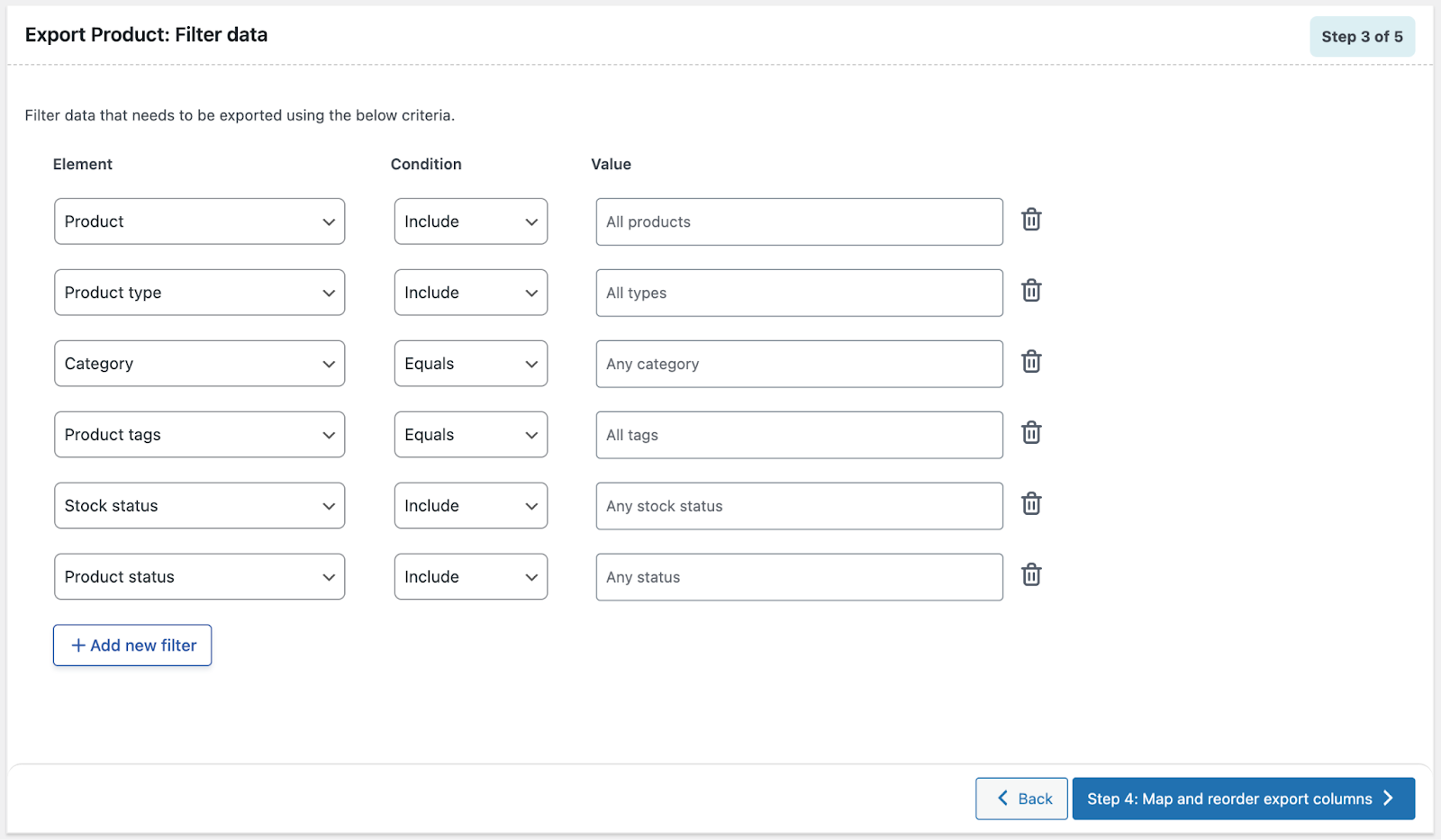
These advanced filtering capabilities help you generate highly targeted export files.
5. Field Mapping & UI Experience
One of the key strengths of the plugin is its intuitive field mapping interface.
- You can automatically map columns from your CSV file to WooCommerce product fields.
- There’s also an option for manual mapping, giving you full control.
- Previously saved mapping templates can be reused to save time on recurring imports.
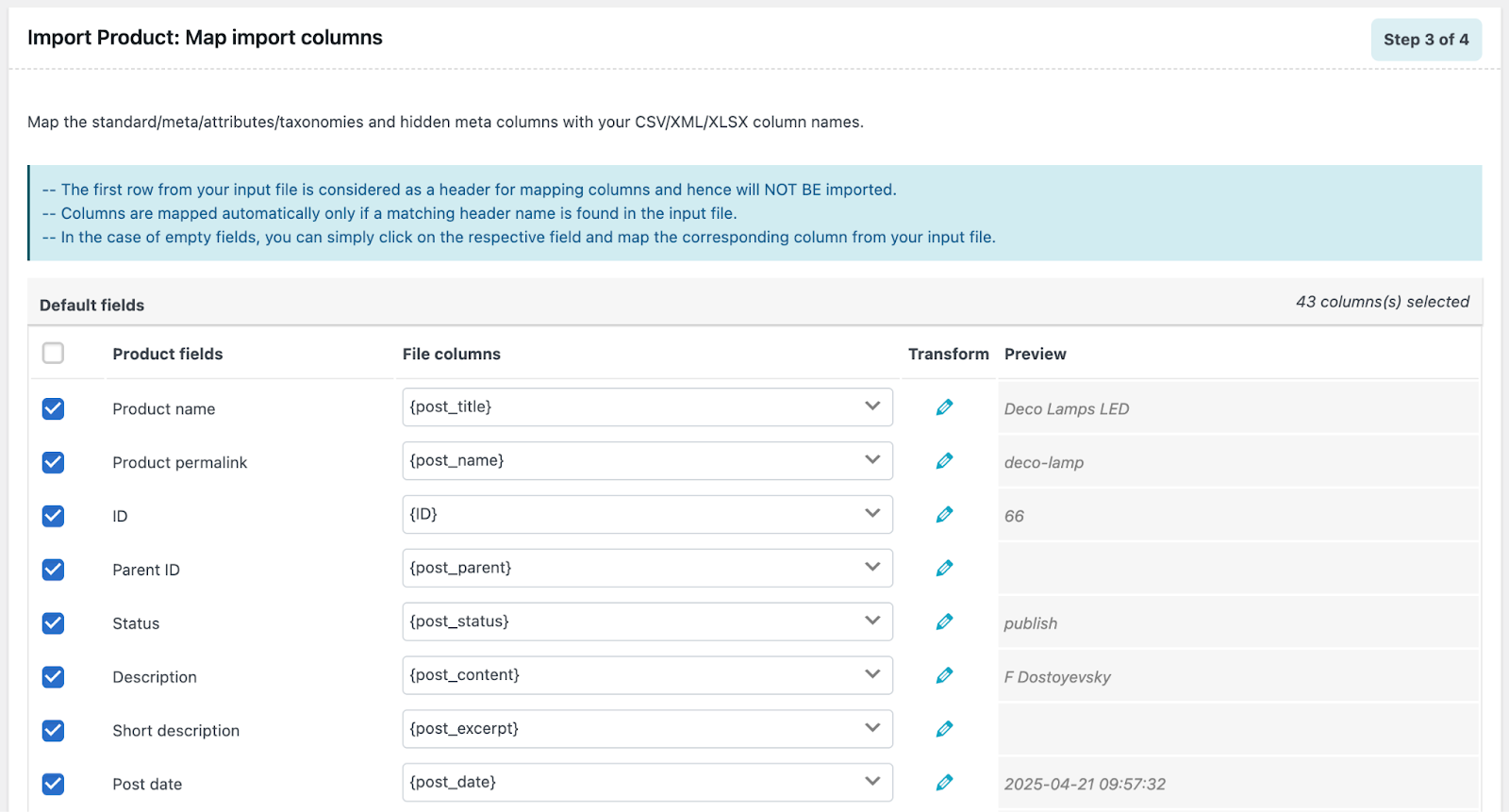
The interface follows a structured, step-by-step workflow, making it easier even for non-technical users.
6. Importing Custom Meta Fields
The WebToffee Product Import Export plugin supports importing custom metadata, ensuring that extended product information is preserved during the import. This includes:
- Custom fields added via themes
- Additional product specifications (e.g., dimensions, materials, technical details)
- Meta fields created by third-party WooCommerce extensions
- SEO-related product metadata
- Advanced pricing or plugin-specific configuration fields
With proper field mapping, these custom meta fields can be matched to the correct columns in your import file. This allows updating or migrating complex product setups without breaking functionality or losing important data.
7. Automated Scheduled Imports & Exports via FTP
For stores that require regular data synchronization, the plugin supports scheduled imports and exports via FTP. This allows you to automate product data transfers without manual intervention.
You can configure the plugin to:
- Automatically import product files from an FTP server
- Export updated product data to a remote location
- Run these processes on a scheduled basis using cron
This is especially useful for stores that sync inventory with suppliers, ERP systems, or external marketplaces. By automating data transfers, you reduce manual workload, minimize errors, and ensure your WooCommerce catalog stays up to date at all times.
8. Import Export Taxonomies, Attributes, and Custom Fields
Beyond basic product details, WooCommerce stores rely heavily on structured data such as categories, tags, attributes, and custom fields. The plugin supports the import and export of these elements, ensuring your product catalog structure remains intact during updates or migrations.
You can manage:
- Product categories and tags
- Global and custom attributes (e.g., size, color, brand)
- Custom taxonomies added by themes or plugins
- Additional custom meta fields
This feature is particularly important when migrating stores or performing bulk updates, as it preserves product relationships, filtering logic, and overall catalog organization.
9. AI-Assisted Product Descriptions During Import
If your import file has missing product descriptions, you can use an AI workflow to generate them automatically before importing into WooCommerce. This plugin can integrate with ChatGPT to fill empty description fields using product title, attributes, and key specs during the import process.
This is especially useful when you’re migrating supplier catalogs or onboarding large inventories, where writing unique descriptions manually would take too long. It also helps improve listing quality and consistency across your catalog.
10. Detailed Logs & Debugging Tools
To ensure smooth product data management, this product import export plugin includes comprehensive logging and debugging tools. Every import and export action, whether completed, failed, or scheduled is recorded, giving you full visibility into what’s happening behind the scenes.
The plugin also allows you to download debug logs, making it easy to share detailed reports with your developer team for faster troubleshooting. This level of transparency helps identify issues quickly and keeps your data operations running reliably.
Usability & Interface
A powerful import/export tool is only useful if it’s easy to navigate. The WebToffee Product Import Export plugin is designed with usability in mind, making complex data operations more approachable for both beginners and advanced users.
Dashboard Experience
The plugin integrates seamlessly into the WooCommerce dashboard, keeping everything within a familiar WordPress admin interface. Import and export options are clearly organized, so users can quickly access product data tools without digging through complicated menus. The layout is clean and structured, helping reduce confusion during bulk operations.
Step-by-Step Wizard
Both import and export processes follow a guided, step-by-step wizard. Instead of overwhelming users with all settings at once, the plugin walks you through each stage:
- Choose the import or export method
- Upload or select the file (for imports)
- Apply filters (for exports)
- Map fields
- Configure advanced options
- Run the process
This structured workflow minimizes mistakes and makes the process easier to follow, even for non-technical users.
Performance & Reliability
When working with large product catalogs, performance becomes a critical factor. A reliable import/export plugin should handle bulk operations efficiently without slowing down your store or causing errors. The WebToffee Product Import Export plugin is built to manage high-volume data transfers while maintaining stability.
Speed & Large Catalog Performance
The plugin is optimized to process large product datasets in batches rather than all at once. This batch processing approach helps maintain performance even when importing or exporting thousands of products, including variable products with multiple attributes and images.
For stores with extensive inventories, this ensures smoother operations and reduces the risk of server overload during bulk updates.
Handling Large Files Without Timeouts
Large CSV or XML files can sometimes cause timeout errors, especially on shared hosting environments. The plugin mitigates this risk by:
- Processing data in smaller chunks
- Allowing scheduled or background execution
- Providing options to limit records per batch
These features help complete large imports or exports more reliably without crashing midway.
Reports & Logging
To maintain reliability, the plugin records detailed reports for every operation. If an import or export fails, the logs provide insight into:
- Failed rows
- Skipped records
- Validation errors
- Execution status
This logging system ensures transparency and allows store owners or developers to quickly identify and resolve issues.
Pricing & Plans
The WebToffee Product Import Export Plugin for WooCommerce is available in both free and premium versions, giving you flexibility based on your needs and budget.
Free Version
The basic, 100% free import export plugin available from the WordPress.org repository lets you perform essential import/export tasks without spending a dime.
However, the free version has limitations. It does not support variable products, subscriptions, advanced field mapping, or some of the enhanced import/export methods that larger stores typically require.
Premium Version
Upgrading to the premium import export plugin unlocks a full suite of advanced import/export features. Pricing is structured based on the number of sites you want to support:
- Single Site – $69 per year
- Up to 5 Sites – $129 per year
- Up to 25 Sites – $249 per year
With the paid version, you get additional capabilities such as:
- Support for all WooCommerce product types, including variable, custom, and subscription products
- Import/export via multiple file formats (CSV, XML, Excel, TSV)
- Advanced filters and conditions for highly targeted exports
- Field mapping and transformation options during import
- Bulk updates (e.g., price, stock) through CSV import
- FTP/SFTP scheduled imports and exports, automation, and cron workflows
- Export product images as separate ZIP files
- Import from URLs and enhanced third-party compatibility
- Priority support and updates for a full year
These premium features are especially valuable for larger stores, recurring workflows, and automated data synchronization.
Pros & Cons
Here’s a balanced look at what the WebToffee Product Import Export Plugin for WooCommerce does well and where there’s room for improvement.
Pros
- Intuitive & Easy-to-Use Interface – The plugin is built with usability in mind. Most tasks follow a clear step-by-step wizard, guiding you through setup, file selection, mapping, and execution. Even store owners with limited technical experience can complete bulk imports and exports confidently.
- Powerful Filtering & Targeted Exports – Instead of exporting your entire catalog every time, the plugin lets you filter products by title, category, SKU, stock status, price range, product type, and more. This flexibility is ideal for targeted reporting, supplier feeds, or segmented data workflows.
- Supports Complex Product Types – Unlike basic tools, the plugin can handle a wide range of WooCommerce product types, including variable products, grouped products, affiliate/external products, custom types, and subscription products (premium). This makes it suitable for stores with diverse catalogs.
- Bulk Updates via CSV – You can not only import products but also update existing products in bulk using CSV. This includes price changes, stock level updates, category reassignments, and meta field updates, saving hours of manual edits.
- Good Documentation & Support – Comprehensive guides, screenshots, and step-by-step examples make setup easier. Downloadable logs and error reporting also help troubleshoot issues quickly. Premium customers receive priority support and updates.
Cons
- Advanced Features Behind a Paywall – While the free version offers solid basic import/export capabilities, many advanced features, such as multiple file formats (XML/Excel/TSV), advanced filtering, scheduled imports/exports, and full support for complex product types, require the premium upgrade.
- Learning Curve for New Users – Although the UI is user-friendly, beginners who are completely new to CSV workflows or bulk data handling may need a short learning period to understand field mapping, filters, and scheduled processes. Some familiarity with spreadsheets also helps.
- Performance Depends on Server Configuration – For very large catalogs (tens of thousands of products), performance can depend on your hosting environment. Low PHP memory limits, short execution times, or constrained server resources may require adjustments to avoid timeouts.
- Limited Built-in Reports – The plugin focuses on import/export operations rather than analytics or visual reports. If you need in-depth reporting or dashboards, you may still need a separate analytics tool or plugin.
Final Verdict
The WebToffee Product Import Export Plugin is a powerful and practical solution for managing WooCommerce product data in bulk. It stands out for its easy-to-use interface, strong filtering options, support for complex product types, and automation capabilities. While many advanced features are available only in the premium version, and beginners may face a slight learning curve with CSV workflows, the overall feature set makes it a dependable tool for growing stores.
This plugin is ideal for store owners, developers, and agencies that regularly handle large catalogs, migrations, or bulk updates. If you want to save time and streamline product management, it’s a worthwhile investment.
Managing Hundreds of Products?
Skip the manual updates. Easily import, export, and bulk edit WooCommerce products.
Get Plugin Now