Let me guess. You’ve had this thought before: my store just needs more traffic.
So you spend more on ads. Publish more blog content. Tweak your SEO. Maybe test another marketing channel because more visitors should mean more sales.
But then the traffic actually arrives… and the numbers barely move. Here’s the frustrating part I want to tell you: traffic usually isn’t the problem.
According to the Baymard Institute, around 70% of online shopping carts are abandoned on average across 50 different studies.
That means for every 10 people who add something to their cart, about 7 walk away without buying.
Think about that for a second – you’ve already paid to bring those people in, and most of them are leaving right at the finish line.
But now you don’t need to redesign your entire WooCommerce store to fix this. Small improvements in the right places can dramatically increase the percentage of website visitors who actually buy.
In this guide, I’ll walk you through 8 practical conversion rate optimization tips that help you close those leaks, recover more sales, and grow your WooCommerce revenue — without relying on more traffic.
So, let’s get started,
TL;DR – CRO Tips & Strategies
- Most WooCommerce stores don’t have a traffic problem; they have a conversion problem
- Around 70% of carts are abandoned, meaning most of your marketing spend leaks out at the finish line
- These 8 Conversion Rate Optimization Tips help you close the leaks: simplified checkout, upfront pricing, faster page speed, trust signals, better product pages, cleaner product feeds, smarter cart recovery, and disciplined testing
- The biggest gains come from connecting these tips into a repeatable CRO process, not treating them as one-off fixes.
- Use product feed manager to sell on 200+ marketplaces (where millions of traffic already have)
What Is Conversion Rate Optimization, Really?
Conversion rate optimization is about getting more of your existing visitors to take action – buy, sign up, or move forward in your checkout.
Most store owners think CRO means changing button colors or redesigning pages. Those help, but they only fix the surface, not the real problem.
Real CRO starts before people land on your store and continues after they leave. It’s about bringing the right visitors, removing friction, and recovering the ones who didn’t buy.
Why CRO Matters More Than “More Traffic”
Once you look at your store through this lens, it becomes obvious why CRO delivers a bigger return than simply chasing more visitors.
Instead of pouring effort into acquiring people, you make the visitors you already have work harder for you. Let me tell you why it is more important:
- Stop paying twice: Once to bring people in, and again when they leave without buying. Every abandoned visitor is a paid loss.
- Get more from every channel: No need to increase your ad budget or push out more content – the same clicks generate more revenue.
- Revenue grows faster: Improving your conversion rate from 2% to 3% is a 50% increase in sales with the same traffic.
- Stay profitable as ad costs rise: When acquisition gets more expensive, better conversion is what keeps your margins intact.
- Recover shoppers who almost bought: With 7 out of 10 carts abandoned, even a small improvement pulls back sales you were already close to earning.
- The results compound: A faster checkout, better product pages, and stronger cart recovery each nudge your numbers up. Combined, they create serious impact.
What Counts as a “Good” Conversion Rate in 2026?
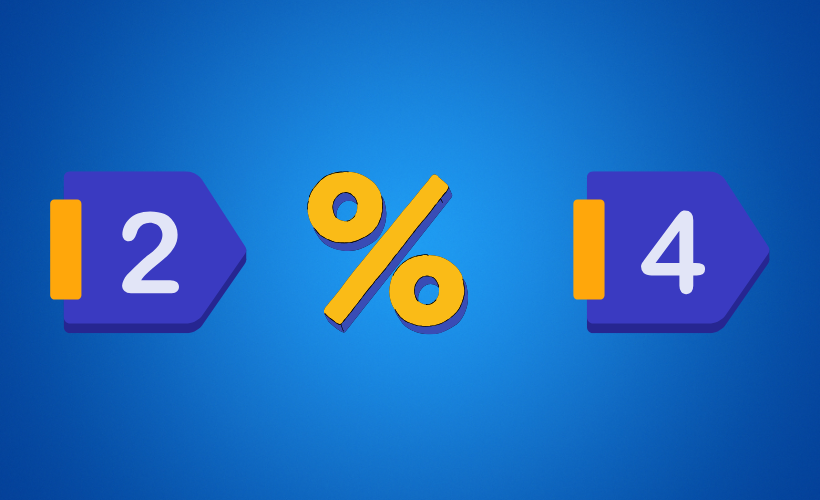
Most well-optimized WooCommerce stores convert somewhere between 2% and 4%, though that shifts depending on your industry, ecommerce category, product type, pricing, and audience.
Some stores sit below that range; established brands with fully optimized funnels can convert much higher.
One thing worth remembering: mobile shoppers on smaller screens abandon carts more often than desktop users, so don’t expect every device to perform equally.
Instead of comparing yourself to a global average, benchmark against stores in your niche and focus on improving your own conversion metrics month after month.
A steady climb from 2% to 2.5% is meaningful progress. Those small gains stack up over time.
8 Conversion Rate Optimization Tips for WooCommerce
Alright, now that you know what CRO actually means, let’s get practical.
The biggest gains rarely come from one massive change. They come from fixing the small friction points where people hesitate, get distracted, or decide not to buy.
These 8 Conversion Rate Optimization Tips walk you through the highest-impact fixes and proven CRO tips you can start implementing this week.
Whether you’re a founder handling everything yourself or a digital marketing manager building out a testing roadmap, these CRO tips form the backbone of a strong conversion rate optimization strategy.
CRO Tip 1 – Cut Your Checkout Down to the Fields You Actually Need
It’s tempting to collect more information for a better customer record. But every extra field gives shoppers another reason to leave.
Most people don’t want to fill out forms. They just want to complete their purchase and move on.
Keep your checkout focused on what’s needed to fulfill the order. Remove optional fields, avoid duplicates, and enable guest checkout.
It’s one of the easiest CRO fixes you can implement in a single afternoon, and it costs nothing.
CRO Tip 2 – Show Every Cost Upfront, Before the Final Step
A lot of store owners assume shoppers leave because their products cost too much. But more often, people leave because the final total is higher than they expected.
A product that looked affordable suddenly includes shipping fees, taxes, or handling charges at the last step. That surprise creates doubt, even if the total is still reasonable.
Show shipping costs and estimated taxes as early as possible in the buying flow. If you offer free shipping over a certain amount, make that minimum crystal clear on product pages and in the cart so shoppers know exactly how close they are.
The Baymard Institute reports that unexpected extra costs are the #1 reason shoppers abandon carts. Setting expectations early removes one of the biggest reasons people leave without buying.
CRO Tip 3: Treat Page Speed as Part of Your Storefront, Not a Developer Task
It’s easy to think page speed is a technical detail your developer should worry about. Your customers never see your PageSpeed score.
What they do notice is when your pages take too long to load. Every extra second makes your store feel slower, less reliable, and less trustworthy, and that quietly kills sales.
This is especially true for landing pages, where a slow load kills the entire ad campaign that brought people in.
Aim for load times under two seconds wherever possible. Compress large product images, remove plugins you no longer use, use responsive designs that adapt cleanly across every app screen and desktop, and optimize website performance across mobile app and desktop views.
These small improvements often overlooked in website design conversations help customers stay focused on buying instead of staring at a loading spinner.
You don’t need to obsess over a perfect score. You just need a store that feels fast enough that customers keep moving forward.
CRO Tip 4: Place Trust Signals at the Moment of Hesitation

Adding customer reviews on your homepage is a decent start, but it doesn’t help the moment shoppers are actually deciding whether to hand over their credit card.
Trust isn’t built in one spot. It’s lost across a dozen small moments. Show reviews on your product pages where shoppers are making decisions.
Display secure payment badges, money-back guarantees, and return policies right where customers enter payment details. These reminders reduce uncertainty when it matters most.
According to the Baymard Institute, around 19% of shoppers abandon their purchase because they don’t trust the site enough to enter their credit card info.
The right trust signals, at the right time, can remove that hesitation before it becomes an abandoned cart.
CRO Tip 5: Write Product Pages That Move, Not Just Describe
Even with a fast, trustworthy checkout, your product page is still doing most of the selling. Most store owners believe a good product page just needs to explain the product.
The problem is that information alone rarely gets someone to click “buy.” Great pages answer the shopper’s questions in the order they naturally think of them.
Lead with the biggest benefit, not a feature dump. Make pricing easy to find. Keep product variants simple. Use high-quality images that show exactly what buyers will receive.
If stock is genuinely limited or a promotion is ending, mention it but don’t fake urgency. Consumers can smell that a mile off.
Here’s the difference:
Weak: “This backpack is made from durable polyester with multiple compartments.”
Better: “Carry everything you need for work or travel without adding extra weight.”
One explains the product. The other gives shoppers a reason to want it.
When you optimize product pages this way, with action-oriented CTA buttons, clear benefits, and personalized product pages based on visitor behavior, you’ll notice conversion metrics start moving up quickly.
Great product content is really just high-quality content that respects the shopper’s time. If you also center product updates and restock notices where they’re most visible, you give returning shoppers even more reason to convert.
CRO Tip 6: Optimize Your Product Feed to Pre-Qualify Buyers
Until now, we’ve been improving what happens after people land on your store. The next step is improving who arrives in the first place.
Most people think of conversion as something you fix once visitors are already on your site. But you know many buying decisions are already shaped before that first click.
A complete, accurate product feed makes sure the right title, image, price, availability, and other details show up across shopping channels.
That means the site visitors who click through already know what to expect, which makes them significantly more likely to complete their purchase.
Google reports that Product Listing Ads convert around 30% better than text ads, and account for 76% of retail search ad spend.
That’s because shoppers see the product before they visit your store, filtering out the browsers who were never going to buy anyway.
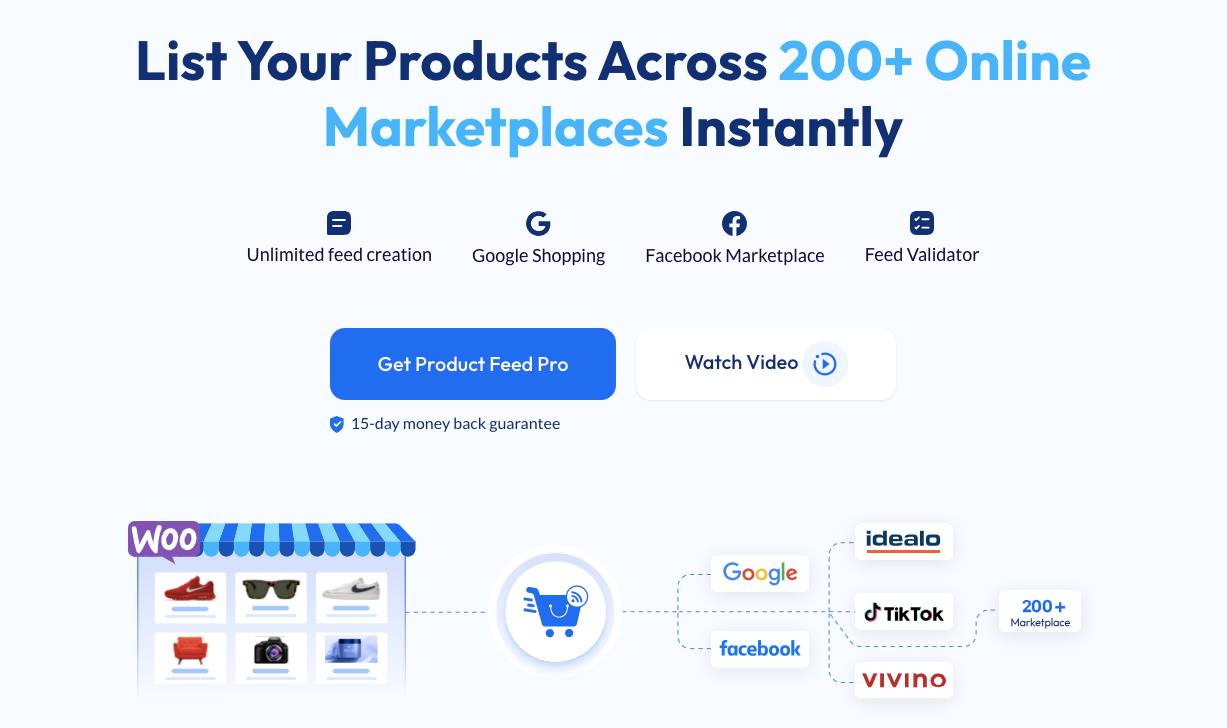
- Use product feed manager to optimize your feed and add all your products in 200+ marketplaces. Start with Google Shopping and Facebook Marketplace, as PFM by Rextheme is the best for those channels; it will help you reach a new audience and optimize your CRO in 200+ channels.
CRO Tip 7: Build a Cart Recovery Sequence That Targets the Hesitant
Even after all of these improvements, some shoppers will still leave without buying.
That doesn’t automatically mean they weren’t interested. A lot of them just need more time, get pulled away, or want to compare a few options before deciding.
Instead of blasting every abandoned cart with the same generic email, focus on the shoppers who showed genuine buying intent.
Display an exit-intent offer when someone’s about to leave, then follow up with a segmented abandoned cart email sequence. Segment those emails by cart value or customer behavior so each message feels relevant.
You won’t recover every abandoned cart, and that’s completely normal. Recovering even a small slice creates additional sales without spending more on traffic.
CRO Tip 8: Test One Change at a Time and Let Data Decide
Once your improvements are in place, resist the desire to change everything at once.It’s easy to think you already know what looks better.
But personal preference doesn’t always match actual customer behavior. A design you love might tank conversions, while a simple layout you overlooked could outperform everything.
Track your checkout funnel in GA4. Use heatmaps and session recordings the tools of efficient user research to spot usability issues and see where people stop.
Run one A/B testing experiment at a time. This is how you shift from guesses to data-driven decisions grounded in evidence, turning raw analytics into revenue-driving insights.
It’s also how conversion rate optimization examples from top ecommerce brands are built: one hypothesis, one experiment, one lesson at a time.
Some teams even build an entire experimentation-led GTM approach around this cycle. Over time, your decisions shift from “I think this looks better” to “I know this sells more.”
From Scattered Conversion Rate Optimization Tips to One System That Runs Itself
Each of those 8 tips can improve your conversion rate on its own. The problem is that most WooCommerce stores treat them as one-off tasks:
they simplify checkout one month, improve page speed the next, then stop until sales dip again.
A smarter approach is to connect them into a repeatable conversion rate optimization strategy.
Instead of reacting to problems, you follow the same conversion rate optimization process every week: bring in better-qualified visitors, make buying easier, increase order value, recover missed sales, and use data to feed the next round.
Here’s what that system looks like in practice.
Step 1: Pre-Qualify Buyers Before They Ever Arrive
Everything covered in these Conversion Rate Optimization Tips so far assumes people are already on your store, but the smartest optimization starts before that click even happens.
The quality of your traffic starts before someone visits your site. When shoppers already know what you’re selling, how much it costs, and what they’ll get, they’re much more likely to buy once they click.
Tools like Product Feed Manager handle this by keeping your titles, prices, images, availability, and variants accurate across Google, Meta, eBay, and Walmart.
The traffic that arrives on your store already expects what it finds instead of getting surprised after the click.
This is the foundation of any good ecommerce conversion rate optimization strategies playbook, and it’s where meaningful website conversion rate optimization really begins.
Pair this with AI competitor research to understand how your listings stack up against similar sellers, and you’ll pre-qualify buyers before they ever touch your site.
Step 2: Turn Your Checkout Into a Single, Frictionless Page
Once qualified shoppers reach your store, the next goal is helping them finish the purchase with as little effort as possible.
A funnel builder like WPFunnels lets you rebuild checkout as one distraction-free page. Customers review their order, enter their details, and complete payment without moving through multiple pages.
Combined with fewer form fields, guest checkout, and upfront pricing, you eliminate most of the reasons people leave before placing their order.
Step 3: Earn More From the Buyers Who Already Said Yes
A lot of store owners think growing revenue means finding more customers.
Actually, one of your best opportunities comes right after someone decides to buy. They’ve already trusted your store, entered their details, and done the hard part.
With WPFunnels, you can boost average order value by adding offers that fit naturally with
- An order bump at checkout for a low-cost complementary item
- A one-click post-purchase upsell that doesn’t require re-entering payment details
- A thank-you page offer encouraging a second purchase before they leave
These lifts add revenue without adding traffic a huge win for first-time customers who might not come back for weeks.
Step 4: Bring Back the Hesitant, Let the Rest Go
Not every abandoned cart deserves the same follow-up.
The Baymard Institute reports that 43% of shoppers abandon carts because they were just browsing or not ready to buy yet.
That means sending relentless emails to every abandoned cart usually creates noise, not sales.
Focus on the shoppers who showed real buying intent. Combine an exit-intent offer with a segmented abandoned cart email sequence based on cart value or behavior.
Mail Mint tool makes it easy to send the right message to the right group instead of treating every shopper the same.
Step 5: Make the Loop Feed Itself
The final step is making sure every improvement helps you make the next one. Track your customer journey with GA4, monitor content engagement, review where people leave, and test one variable at a time.
When you only change one thing, you know exactly what caused the lift.
Over time, this becomes an ongoing loop instead of a one-off project.
- A clean product feed brings in better-qualified shoppers.
- A structured checkout gives you cleaner conversion data.
- Well-designed content funnels from ad to landing page to checkout feed each other with better data every cycle.
Use an ROI calculator to project the impact of each change before you commit resources. That data helps you make sharper improvements.
Those improvements produce even better results next round. This is how your store keeps growing without you constantly chasing more traffic.
You Were Never One Ad Campaign Away From Growth
Now, I am going to tell you one thing that most WooCommerce owners realize far too late. Your biggest opportunity was never finding more people. It was helping more of the people you already have actually become customers.
When you bring in better-qualified traffic, make checkout easier, boost order value, recover interested shoppers, and keep improving based on real data, your store grows without depending on a bigger ad budget.
You don’t have to fix everything this week. Start with the single leak that’s costing you the most. For most stores, that’s either enabling guest checkout or cleaning up a product feed so shoppers arrive with the right expectations.
Fix that first. Measure it. Then move to the next. Small changes made consistently will do far more for your revenue than sending more traffic into a store that isn’t ready to convert it.
Conclusion
Growth in ecommerce isn’t about chasing every new marketing channel or spending more on ads. It’s about making your existing traffic count.
The 8 Conversion Rate Optimization Tips in this guide aren’t glamorous. Nobody’s building conference keynotes around them.
But they’re the fundamentals that separate stores quietly getting money at checkout from stores that steadily grow month after month, even when acquisition costs go up.
Start with one leak. Fix it. Measure the change. Then move to the next. That’s the whole system.
If you are ready to grow your WooCommerce store, I recommend exploring Product Feed Manager, WPFunnels, and Mail Mint to build a complete CRO system that runs itself.
** FAQs **
What is a good conversion rate for a WooCommerce store?
A good conversion rate for most WooCommerce stores is usually between 2% and 4%. It can change based on your niche, pricing, and how qualified your traffic is. Focus on improving your own numbers steadily instead of chasing averages.
Why do shoppers abandon carts in WooCommerce?
Most shoppers leave because of unexpected costs, forced signups, or trust issues at checkout. These create friction at the final step when they are ready to buy. Fixing these points can quickly recover lost sales.
How does product feed quality affect conversion rate?
Product feed quality shapes what buyers expect before they click on your listing. Clear and accurate data brings in people who already know what they want. This leads to better traffic and higher conversions.
How can you grow revenue without increasing traffic?
You can grow revenue by converting more of the visitors you already have. This means removing friction and making the buying process easier. Small improvements here often outperform spending more on ads.
When do CRO improvements start showing results?
Most CRO changes start showing results within two to four weeks. The speed depends on your traffic and how fast you collect data. Consistent small improvements will add up over time.